Introduction: Could Teaching Online Help Pay Your Monthly Bills?
If you’re a stay-at-home mom looking for a way to bring a little extra money into your household without giving up the time you have at home with your children, I want to introduce you to an option you may not have considered: teaching online from home.
When most people hear the words online teacher, they immediately think they need a teaching degree, a state teaching license, or years of experience standing in front of a classroom. While some online teaching jobs certainly require those qualifications, there are also platforms that allow everyday people to teach, tutor, and share skills they already have—without having a college degree.
And when I say teach, I don’t just mean teaching algebra or grammar. Think about what you know how to do. Maybe you’re great at preschool activities, reading with children, cooking, art, crafts, music, a foreign language, crocheting, gaming, or even leading a fun social club for kids. There are families looking for all kinds of learning experiences online.
Hi! Im Velvet Mumma.
Mom. Early Childhood Specialist. Blogger.
Online teaching is also something I have personal experience with. Outschool is one of my favorite online teaching platforms, and later in this article I’m going to tell you what I like about it—as well as some of the things I don’t. I’ll also introduce you to several other platforms so you can decide which one might work best for you.
I’m not going to tell you that signing up for a website will magically make you thousands of dollars next month. Online teaching takes work, and income is never guaranteed. But what if you could make enough to pay your internet bill? What if you could cover your electric bill, put an extra $100 toward groceries, or make your car payment without leaving home?
That’s the way I want you to think about online teaching.
You don’t necessarily have to replace an entire paycheck for the extra income to make a difference.
Let’s look at what earning from home could realistically mean for your family.
1. How Much Money Can You Make Teaching Online?
The first question you’re probably wondering is: How much can I actually make?
The answer is going to be different for everyone.
Your income can depend on the platform you choose, what you teach, what you charge, how often you teach, how many students you have, and whether you’re teaching students individually or in groups.
Some platforms determine what teachers are paid. Others allow teachers and tutors to set their own rates. And on platforms such as Outschool, having multiple learners enrolled in the same class can change the earning potential considerably.
Instead of starting with a huge income goal, I recommend thinking about what you’d like your online teaching income to accomplish.
What Would It Take to Make an Extra $100 a Month?
Let’s start small.
To make an additional $100 per month, you’d need to average about $25 per week.
That suddenly sounds a lot less intimidating, doesn’t it?
You don’t need to build a six-figure online business. Your first goal might simply be finding enough students to make $25 this week.
Then do it again next week.
Once you’ve earned your first $100, you can decide whether you want to keep your teaching schedule small or start adding additional classes and students.
What About $500 a Month?
An additional $500 per month works out to approximately $125 per week.
For many households, $500 of additional monthly income could make a noticeable difference.
At this level, you might teach several days per week, tutor several regular students, or create classes that allow you to teach multiple learners simultaneously.
This is also where choosing the right platform becomes especially important. If you’re earning a set hourly rate teaching one student at a time, your income is closely tied to the number of hours you work.
If you’re able to set your own prices or teach several paying students in one class, the math can look very different.
Could You Make $1,000 a Month Teaching Online?
To earn approximately $1,000 per month, you’d need to average around $250 per week.
That’s a bigger goal, but breaking it into weekly numbers makes it easier to understand.
For example, imagine that after platform fees you earned $50 from teaching a group class. Teaching five of those classes during the week would equal $250.
That’s just an example—not a promise of what you’ll earn. You still need students to enroll.
Your actual income will depend on your prices, platform fees, student enrollment, demand, teaching schedule and other factors.
But this is why I particularly like the possibilities that come with group teaching. You’re not necessarily limited to earning money from one student during each hour that you work.
Can You Make More Than $1,000?
Potentially, yes.
There are online teachers and tutors who turn teaching into a significant source of income. There are also people who intentionally teach only a few hours each week because they simply want some extra spending money.
Neither approach is wrong.
As a stay-at-home mom, you get to decide what you’re trying to accomplish.
Maybe you don’t want another full-time job.
Maybe you just want something you can do during nap time, while your children are at school, in the evenings, or during a few designated hours each week.
Start with the amount of money that would make a meaningful difference to your family and work backward from there.
2. What Could Your Online Teaching Income Help Pay For?

One of the reasons I like looking at online teaching income in smaller amounts is because $100 doesn’t sound like much until you give that $100 a job.
Don’t just say:
“I only made $100 this month.”
Instead, think:
“I taught online this month and paid our internet bill.”
That’s an accomplishment.
If You Made an Extra $100 a Month…
That money could potentially go toward:
- Your cell phone bill
- Internet
- Gas
- Children’s activities
- Household supplies
- School or homeschool supplies
- A small savings goal
- Part of your grocery bill
Now imagine deciding that your online teaching income will always pay your internet bill.
Suddenly, that’s one household expense you no longer have to take from your regular monthly income.
If You Made an Extra $500 a Month…
Now we’re talking about an amount that could have a much more noticeable impact on a family’s monthly budget.
An additional $500 might help cover:
- Groceries
- Electricity and water
- A car payment
- Car insurance
- Credit card payments
- Homeschool expenses
- Children’s clothing and activities
- Savings
- Several smaller monthly bills
And remember, that’s roughly $125 per week.
Instead of looking at a $500 goal and thinking, There’s no way I can do that, ask yourself:
“How could I earn $125 teaching this week?”
That’s a much easier problem to tackle.
If You Made an Extra $1,000 a Month…
An additional $1,000 every month could make a substantial difference for many families.
Depending on your household expenses, it could help with:
- Rent or mortgage
- Groceries
- Utilities
- Transportation expenses
- Debt payments
- Emergency savings
- Children’s expenses
- Several monthly bills at once
You could even create a specific goal for your teaching income.
For example:
My regular household income pays our major expenses. My online teaching money pays for groceries.
Or:
Every dollar I make teaching online goes toward paying off debt.
Or:
I’m going to use my first $1,000 to build our emergency fund.
Giving your extra income a purpose can make those first few classes feel much more meaningful.
Your first goal doesn’t have to be, I’m going to make enough money to quit my job.
For a stay-at-home mom, a much more realistic beginning might be:
“I’m going to see if I can pay one monthly bill by teaching from home.”
3. Do You Need a Degree to Teach Online?
Here’s the good news: not always.
There are online teaching and tutoring platforms where you can get started without having a bachelor’s degree or a traditional teaching license.
That doesn’t mean every online teaching company will accept applicants without a degree. Some absolutely require one. Requirements can also change, so you should always check the current qualifications directly with the platform before applying.
But don’t automatically count yourself out simply because you aren’t a certified teacher.
There is an important distinction between having a teaching degree and having something valuable to teach.
You may have years of knowledge and experience that never came from sitting in a college classroom.
Maybe you’ve homeschooled your children.
Maybe you’ve spent years working with preschoolers.
Maybe you’re an amazing artist.
Maybe you speak another language.
Maybe you play an instrument.
Maybe you’re the person everyone calls when their child is struggling with math.
Maybe you know how to crochet, bake, draw, code, play chess, or teach children how to read.
Those are skills.
And skills can be taught.
What Qualifications Might You Need?
Even when a platform doesn’t require a college degree, it may still have other requirements.
Depending on the company, these might include:
- Being at least 18 years old
- Passing a background check
- Identity verification
- Living in an eligible country
- Speaking a particular language fluently
- Demonstrating knowledge of your subject
- Having reliable internet
- Having appropriate computer equipment
- Completing an application or profile
- Recording an introductory video
- Following the platform’s teaching and safety policies
For example, Outschool does not require formal teaching credentials, but prospective educators still must meet its eligibility requirements, verify their identity and complete a criminal background check.
Cambly currently states that tutors do not need a teaching certificate, bachelor’s degree, or previous teaching experience.
That’s exactly why I wanted to write this article.
There are moms sitting at home right now thinking:
“I’d love to teach online, but I don’t have a teaching degree.”
Don’t let that assumption stop you before you’ve even researched your options.
Your Experience Counts Too
I also want to emphasize something that can easily get overlooked.
Experience has value.
If you’ve spent years homeschooling children, working in childcare, volunteering with children, leading activities, tutoring, teaching Sunday school, coaching, creating art, playing music, or developing another skill, don’t immediately dismiss that experience because it didn’t come with a diploma.
Of course, you should never claim credentials you don’t have. Be completely truthful about your education and experience.
But you also don’t need to minimize what you do know.
Start by asking yourself three questions:
What am I good at?
What do I know enough about to teach someone else?
What would I actually enjoy teaching from home?
Write down your answers.
Because in the next part, we’re going to turn those answers into actual ideas for what you could teach online and what you need to get started.
Would you like Section 4: What Can You Teach, Section 5: What You Need to Start, or both together next?
4. What Can You Teach Online?

Now that you know you don’t necessarily need a teaching degree, your next question may be:
“But what would I teach?”
This is where online teaching can get really interesting.
When you think about teaching, you might automatically picture traditional school subjects like reading, math, science, and history. Those are certainly options, but online learning goes far beyond traditional academics.
People are willing to pay to learn skills, hobbies, languages, creative activities, and specialized subjects too.
Before deciding that you don’t have anything to teach, take inventory of what you already know.
Traditional Academic Subjects
If academics are your strength, you might teach or tutor:
- Reading
- Phonics
- Writing
- Grammar
- Math
- Science
- History
- Geography
- English
- Spelling
- Homework help
- Test preparation
You don’t necessarily have to teach advanced subjects either.
If you’re comfortable helping a six-year-old practice beginning reading skills, you don’t need to know how to teach high school literature.
Teach what you know and stay within your area of expertise.
Preschool and Early Learning
If you love working with little ones, there are plenty of possibilities.
You might teach:
- ABCs
- Letter sounds
- Numbers
- Counting
- Shapes
- Colors
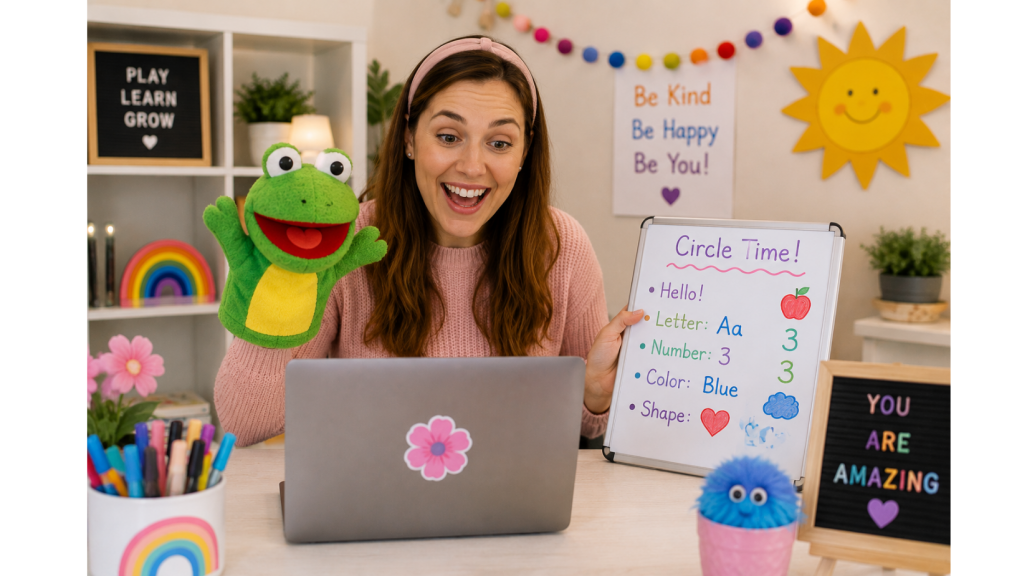
- Preschool circle time
- Kindergarten readiness
- Story time
- Beginning phonics
- Early reading
- Show-and-tell
- Songs and movement
- Preschool science
- Preschool math
You can also combine subjects to create something more interesting.
Instead of simply offering a class called Preschool Math, you might create a dinosaur counting class, princess-themed number class, farm animal preschool class, or an ABC scavenger hunt.
That’s one of the things I love about online teaching: learning doesn’t have to look like traditional school.
Teach a Hobby or Talent
Maybe academics aren’t your thing.
That’s okay!
What do you enjoy doing?
You might be able to teach:
- Drawing
- Painting
- Crafts
- Crochet
- Sewing
- Cooking
- Baking
- Cake decorating
- Photography
- Music
- Singing
- Dance
- Creative writing
- Chess
Something that feels easy or ordinary to you may be something another person would love to learn.
Teach English Online
Teaching English is another option, especially if you would rather work with adults or international learners.
Some platforms connect English speakers with people who simply want to practice conversational English.
Depending on the platform, you may not need to create elaborate lesson plans. Your role may be helping someone practice pronunciation, vocabulary and everyday conversation.
We’ll talk about one of these options, Cambly, later in this article.
Clubs and Social Classes
This is one area that surprised me when I first learned more about online teaching.
Not every class has to look like a traditional lesson.
Depending on the platform and its current policies, you may find opportunities involving:
- Book clubs
- Social clubs
- Gaming
- LEGO building
- Drawing clubs
- Conversation groups
- Show-and-tell
- Storytelling
- Creative writing
- Special-interest groups
A child who absolutely loves dinosaurs might enjoy meeting other children who love dinosaurs.
A young artist may want to draw while socializing with other children.
A child who loves a particular game may enjoy an organized social group built around that interest.
You’re not limited to worksheets and textbooks.
Start With What You Already Know
If you’re having trouble deciding what you could teach, don’t immediately start searching for a new skill to learn.
Start with yourself.
Grab a piece of paper and answer these questions:
What am I really good at?
What do I enjoy doing?
What do people ask me for help with?
What have I taught my own children?
What did I do professionally before becoming a stay-at-home mom?
What hobbies have I spent years developing?
What could I comfortably talk about or demonstrate for 30 minutes?
You may discover that you already have several potential teaching ideas.
And here’s something else to remember:
Your first class doesn’t have to be your forever class.
You can start with one idea, see how students respond, learn from the experience and adjust as you go.
You don’t need to have your entire online teaching career planned before you teach your first student.
5. What Do You Need to Start Teaching Online?
Now you have an idea of what you could teach.
The next question is:
“How much is this going to cost me?”
Potentially, not very much.
If you already have a computer and reliable internet connection, you may already own most of what you need.
One of the biggest mistakes I think people make when starting something new is spending money before they’ve made money.
You don’t need to create the perfect online classroom before you’ve taught your first class.
Start With the Basics
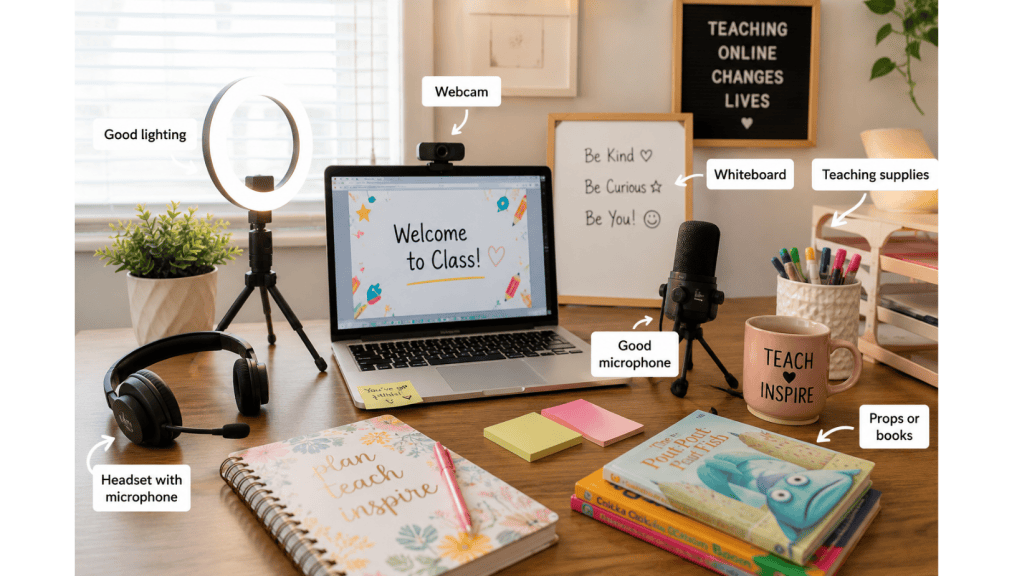
Depending on the platform you choose, you’ll generally want access to:
- A computer or laptop
- Reliable high-speed internet
- A webcam
- A microphone
- A quiet place to teach
- Adequate lighting
- A clean, appropriate background
- Any materials needed for your particular lesson
Your computer may already have a perfectly good camera and microphone.
Use them.
Your first teaching space doesn’t need to look like a professional television studio.
It needs to be clean, quiet, well-lit and appropriate for the people you’re teaching.
Create a Simple Teaching Space
If you’re teaching children, especially younger children, you may eventually want your background to feel welcoming and engaging.
But don’t feel like you have to spend hundreds of dollars decorating it.
You could start with:
- A clean wall
- Small bookshelf
- Educational poster
- Whiteboard
- Simple decorations
- A few teaching props
If you’re teaching adults, you may need even less.
A clean wall, good lighting and professional appearance may be enough.
The focus should be on you and what you’re teaching, not how much money you spent decorating the room behind you.
Use Materials You Already Own
This is especially helpful if you’re going to teach children.
Look around your house before you go shopping.
You might already have:
- Children’s books
- Flashcards
- Dry-erase board
- Markers
- Puppets
- Toys
- Blocks
- Counting manipulatives
- Art supplies
- Musical instruments
- Games
- Printable resources
- Craft supplies
If you’re teaching a cooking class, you probably already own basic kitchen equipment.
If you’re teaching crochet, you probably already have yarn and hooks.
If you’re tutoring math, a whiteboard and marker may be enough to get started.
Build your supplies as your income grows.
What About Lighting and Sound?
Students need to be able to see you and hear you clearly.
Before purchasing equipment, test what you already have.
Sit where you plan to teach and make a practice video.
Ask yourself:
Can I clearly see my face?
Can I hear myself?
Is there distracting noise?
Is there a bright window behind me?
Does my internet connection remain stable?
You may discover that simply moving a lamp or changing where you sit makes a huge difference.
Later, you might decide to purchase a ring light, external microphone, headset or upgraded webcam.
Those are upgrades—not necessarily day-one requirements.
Don’t Forget About Your Internet
Reliable internet is one of the most important parts of teaching online.
You could have an amazing lesson planned, but it won’t matter much if students can’t hear or see you because your connection keeps dropping.
Before applying to platforms, test your internet and make sure your teaching location has a strong connection.
If possible, have a backup plan for occasional technical problems.
You’ll Also Need Something to Teach
Equipment is only half of the equation.
You need an actual teaching offer.
Don’t make this harder than it needs to be.
Your first class might be:
30-Minute Preschool ABC Adventure
or
Beginner Drawing: Let’s Draw a Cute Puppy
or
Conversational English for Beginners
or
First Grade Reading Practice
or
Learn to Crochet Your First Chain
You don’t need to create 20 different classes before you start.
Start with ONE.
Create it.
Teach it.
Improve it.
Then create another.
Things You Can Buy Later
Once you’ve actually started earning money, you may decide to reinvest some of it.
Possible upgrades could include:
- Better webcam
- External microphone
- Headset
- Ring light
- Second monitor
- Teaching backdrop
- Whiteboard
- Digital teaching resources
- Props
- Educational manipulatives
- Additional craft or lesson supplies
But I would put those purchases in the “later” category.
There is no reason to spend $500 creating an online classroom to find out three weeks later that you don’t even enjoy teaching online.
Start simple.
What I Would NOT Buy Before Getting Started
If you’re trying online teaching because you need additional money for your household, protect the money you already have.
I wouldn’t rush out and purchase:
- An expensive new computer when your current one works
- Hundreds of dollars of classroom decorations
- Expensive online teaching courses
- Professional photography
- Fancy microphones
- Huge collections of teaching materials
- A website
- Paid advertising
There may eventually be good reasons to invest in some of these things.
But first?
Get a student.
Then get another.
Make your first $25.
Then your first $100.
Once you’ve proven that you enjoy teaching online and have found something students are willing to pay you to teach, you can decide how much of that income you want to reinvest.
Your Goal Is to Start, Not to Look Perfect
If you’re a stay-at-home mom reading this because you need a way to bring additional money into your household, I don’t want the startup costs to become another financial burden.
Use the computer you already have.
Use the supplies you already own.
Teach something you already know.
Set up a simple space.
And start there.
Your first online classroom doesn’t need to be perfect. It just needs to be good enough for you to teach your first student.
Next, we’re going to put all of this together and walk through exactly how to get started teaching online—from choosing your first subject to creating your first class or tutoring offer.
Which should we write next: 6—Getting Started or 6 & 7—Getting Started + Where to Teach?
6. How Do You Get Started Teaching Online?

By this point, you may be thinking:
“Okay, I have something I could teach, I have a computer, and I know I don’t necessarily need a degree. But how do I actually get started?”
This is the point where I want you to keep things simple.
When you’re excited about a new opportunity, it’s easy to try to do everything at once. You start researching five different platforms, creating ten class ideas, shopping for teaching supplies, watching videos, and comparing webcams.
Before you know it, you’ve spent two weeks preparing to start without actually starting.
Don’t do that.
Your goal is to go from:
“I think I could teach online.”
to:
“I taught my first student.”
Here’s how.
Step 1: Decide What You Want to Teach
Start with one subject, skill, or interest.
Remember the questions we talked about earlier:
- What are you good at?
- What do you enjoy?
- What do people ask you for help with?
- What experience do you already have?
- What could you comfortably teach someone else?
Don’t worry about finding the most profitable subject on the internet.
Start by finding something you are qualified and comfortable teaching.
If you love working with young children, that might be preschool circle time, beginning phonics, or kindergarten readiness.
If you’re artistic, maybe it’s drawing.
If you love cooking, perhaps it’s a beginner cooking class.
If you enjoy talking with people, conversational English might be worth exploring.
Pick one.
You can always expand later.
Step 2: Decide WHO You Want to Teach
This is just as important as deciding what you want to teach.
Would you rather work with:
- Preschoolers?
- Elementary-aged children?
- Tweens?
- Teenagers?
- Adults?
- English-language learners?
Teaching a four-year-old online is very different from tutoring a teenager in algebra or having an English conversation with an adult.
Think about the age group you’re most comfortable interacting with.
For stay-at-home moms, your schedule may influence this decision too. If your own children are home during the day, evening classes might work better. If your children are in school, daytime teaching may fit perfectly.
Choose something that works with your real life—not the schedule you wish you had.
Step 3: Choose Your Platform
This is where many people get overwhelmed.
You don’t need to sign up for every online teaching website you can find.
In fact, I recommend the opposite.
Pick one platform and learn how it works.
Read its requirements.
Look at the types of lessons being offered.
Learn how teachers get paid.
Understand the fees.
Find out whether you set your own prices or the company determines your pay.
See whether you’ll be teaching children or adults.
Then decide whether the platform actually fits what you want to do.
Later in this article, I’ll introduce you to five places to consider—including my personal favorite, Outschool.
Step 4: Research Before Creating Your First Offer
Before you create a class, spend some time looking around the platform.
This isn’t about copying another teacher’s work.
You’re researching the marketplace.
Look at things like:
- What subjects are being offered?
- What age groups are being served?
- How long are classes?
- What are teachers charging?
- Are classes one-on-one or group-based?
- How are successful teachers describing their classes?
- What kinds of classes appear to have reviews?
- Where could your own knowledge fit?
This can help you avoid creating something that sounds wonderful to you but doesn’t solve a problem or meet an interest families are actually looking for.
Step 5: Create Your Profile
Your profile is often one of the first things a potential student or parent will see.
You don’t need to pretend you’re something you’re not.
If you aren’t a certified teacher, don’t call yourself one.
Instead, focus on what you do bring to the table.
Maybe you’ve homeschooled for ten years.
Maybe you’ve worked in childcare.
Maybe you’ve played piano since you were six.
Maybe you’ve been crocheting for twenty years.
Maybe you’re bilingual.
Maybe you’ve worked professionally in your field.
Maybe you’ve successfully taught the skill to your own children.
Talk about your relevant experience, why you enjoy the subject, and what students can expect when learning with you.
Be confident in the experience you actually have.
Step 6: Create Your First Class or Tutoring Offer
Keep your first offer simple and specific.
Instead of:
“I Teach Preschool”
try:
“ABC Adventure: Learn 5 Letter Sounds Through Games and Movement”
Instead of:
“Art Class”
try:
“Let’s Draw a Cute Puppy: Beginner Drawing Class for Kids”
Instead of:
“English Tutor”
try:
“Relaxed Conversational English Practice for Beginners”
Parents and students should be able to quickly understand:
What will I learn?
Who is this for?
Why should I choose this class?
Step 7: Practice Before You Go Live
Do a practice run.
Turn on your camera.
Teach your lesson.
Time yourself.
You may discover that the 30-minute lesson you planned only takes 12 minutes.
Or you may discover that you planned enough material for two hours!
Practice helps you identify those problems before you’re sitting in front of a paying student.
It’s also a great time to check your lighting, camera, microphone, background, internet connection, and teaching materials.
Step 8: Get Your First Student
This should be your first big goal.
Not $5,000.
Not quitting your job.
Not becoming a full-time online teacher.
One student.
Your first student teaches you things that hours of research can’t.
You’ll discover what works, what feels awkward, what students respond to, what needs changing, and whether you actually enjoy teaching online.
Then you can improve.
Your progression might look something like this:
First student → First review → First $25 → First $100 → First repeat student → First $500 month
One step at a time.
7. Where Can You Teach Online Without a Teaching Degree?
Now for the part you’ve probably been waiting for.
Where do you actually go to find students?
There are a number of online teaching and tutoring platforms, but they don’t all work the same way.
Some platforms give you considerable control over what you teach and what you charge.
Others are much more structured.
Some focus on children.
Others focus on adults.
Some are primarily for traditional tutoring, while others allow much more creative classes.
And the qualifications vary from platform to platform.
Here are five places I think are worth investigating if you’re interested in teaching from home.
Important: Platform requirements, fees, pay rates, and application availability can change. Always check the company’s current requirements before applying.
1. Outschool — My Personal Favorite
Let’s start with the platform I’m most excited to tell you about: Outschool.
Outschool is an online learning marketplace primarily for children and teens. What makes it different from many traditional tutoring companies is that educators can create their own classes.
And those classes don’t have to be traditional school subjects.
You can find classes involving academics, art, gaming, social groups, life skills, hobbies, and countless special interests.
Outschool currently states that educators do not need formal teaching credentials. You do, however, have to meet its eligibility requirements, complete identity verification, and undergo a criminal background check.
Another major difference is the earning model.
Rather than simply being told, “We’re going to pay you $12 an hour,” Outschool educators create their classes and set their prices. Outschool currently takes a 30% teacher fee from paid enrollments, leaving the educator with 70%.
That group-class model is one of the reasons I think Outschool deserves special attention.
Imagine charging $15 per learner for a class.
If one student enrolls, that’s $15 in enrollment revenue before Outschool’s fee.
But if six students enroll?
That’s $90 in enrollment revenue for the same class time before the platform fee.
Of course, six students aren’t guaranteed to enroll. Sometimes you may have one. Sometimes you may have several. Sometimes a class may not enroll at all.
And that’s something I definitely want to talk about.
Outschool has pros and cons, and because I have experience with it myself, I’m going to give you a much closer look at both.
2. Preply
Preply is an online tutoring marketplace that connects tutors with students around the world.
It’s particularly well known for language learning, although the platform supports tutoring across more than 100 subjects.
One attractive feature is that Preply currently says no specific certification or teaching experience is required. Tutors create profiles, select subjects, establish availability, and set their hourly rates.
That makes it quite different from a company that hires you at one predetermined hourly wage.
Preply may be particularly appealing if you prefer working one-on-one rather than managing a group of children.
The downside is that you’ll need to build a profile that attracts students, and Preply charges commission. New tutors also have to establish themselves and earn reviews.
Still, if you have a subject you know well and enjoy individual instruction, it’s worth investigating.
3. Cambly
Cambly offers a very different type of teaching experience.
Instead of creating children’s classes or tutoring dozens of academic subjects, Cambly primarily connects English learners with English-speaking tutors for conversation practice.
This can make it appealing to someone thinking:
“I don’t know if I could create an entire class, but I could definitely have a conversation with someone and help them practice English.”
Cambly currently says no teaching certificate, bachelor’s degree, or prior teaching experience is required.
Cambly also determines the tutor pay rather than having tutors create their own rates. It currently advertises $10.20 per hour on Cambly and $12 per hour on Cambly Kids, calculated by the minute spent talking with students.
One important thing to know before getting too excited: Cambly currently says it is limiting the number of new tutors being accepted.
That’s a perfect example of why you should always check the current status of a platform before making plans around it.
Learn about tutoring with Cambly
4. Wyzant
Wyzant is geared more toward traditional tutoring.
Students use the marketplace to find tutors for specific subjects, and tutors create profiles showcasing their experience and areas of expertise.
This may be a better fit if you’re thinking:
“I’m really good at math.”
“I can help children with reading.”
“I know chemistry.”
“I could tutor someone in writing.”
rather than:
“I want to create my own online children’s classes.”
Wyzant allows tutors to set their own hourly rates, although the platform takes a service fee.
One important consideration is eligibility. Wyzant currently requires tutors to reside permanently in the United States and have a valid Social Security Number, among other requirements. Tutors also need to demonstrate proficiency in the subjects they want to teach.
So while it can provide flexibility, it’s important to read the current tutor requirements carefully before applying.
Learn about tutoring on Wyzant
5. Tutors.com
Another option to investigate is Tutors.com.
This platform helps connect people searching for instruction with tutors and teachers offering services.
It can be worth exploring if you already have a clear idea of what you want to teach and you’re looking for another way to connect with potential students.
As with the other marketplaces, you’ll need to consider the current requirements, how leads or clients are obtained, what costs are involved, and whether the platform makes financial sense for the type of tutoring you plan to offer.
This is also a good reminder that you don’t have to build your entire online teaching career around one company forever.
You might start with one platform, gain experience, figure out what you enjoy teaching, and eventually explore additional ways to find students.
Don’t Apply to All Five Today
After reading about several opportunities, it can be tempting to open five browser tabs and start filling out applications.
I wouldn’t.
Go back to what you decided you wanted to teach.
Then ask:
Which platform fits THAT type of teaching best?
If you want to create fun, original classes for children, I would look closely at Outschool.
If you want traditional one-on-one tutoring, investigate Preply or Wyzant.
If you’d enjoy helping people practice conversational English, take a look at Cambly.
Your goal isn’t to get accepted onto the most platforms.
Your goal is to find the platform that gives you the best opportunity to turn something you already know into income from home.
And next, we’re going to take a much closer look at these choices—including the pros and cons of each platform and why Outschool remains a favorite of mine.
Great choice. Since this is a platform you’ve actually used, I’d make the Outschool section feel more personal than the others. I’d also clearly disclose that your link is a referral link. Outschool’s current teacher-referral program says a new teacher needs to create their account through the referring teacher’s link for the referral to be properly attributed. (Outschool Support)
8. Outschool Deep Dive: My Favorite Platform for Teaching From Home
Of all the online teaching platforms we’re discussing, Outschool is a favorite of mine.
What I like about Outschool is that it doesn’t put you into a little box and tell you exactly what you have to teach. You have the opportunity to take your own knowledge, experience, hobbies, and interests and turn them into classes for children and teens.
If you’re a stay-at-home mom who loves the idea of teaching from home but doesn’t necessarily have a traditional teaching degree, this is one platform I think is worth taking a closer look at.
And I want to take you behind the scenes a little more with Outschool because I have personal experience with this platform. There are things I really like about it, but there are also some realities you need to understand before you sign up.
What Exactly Is Outschool?
Outschool is an online learning marketplace where independent educators offer virtual classes for children and teens.
The students learn online, so you can teach right from your own home.
But here’s what makes Outschool particularly interesting:
You get to create your classes.
You aren’t necessarily handed a company’s curriculum and told exactly what to teach every day.
You might teach:
- Preschool
- Phonics
- Reading
- Math
- Science
- History
- Art
- Drawing
- Crafts
- Music
- Cooking
- Life skills
- Book clubs
- Social groups
- Gaming-related classes
- Special-interest classes
You can build classes around areas where you have genuine knowledge or expertise.
That flexibility is one of my favorite things about the platform.
You Don’t Need a Teaching Degree
This is a big one.
Outschool currently states that it does not require formal teaching credentials.
That doesn’t mean there aren’t requirements.
Educators must be at least 18, live in one of Outschool’s currently supported countries, have a good command of written and spoken English, have reliable internet, be able to receive PayPal payments, and have expertise or a passion they can build classes around.
You’ll also need to verify your identity and pass a criminal background check.
So no, you can’t simply sign up this afternoon and immediately start teaching children.
But not having a teaching degree doesn’t automatically disqualify you.
That’s important for stay-at-home moms who may have years of valuable experience but don’t have a bachelor’s degree or teaching license.
How Do You Apply?
The process starts with applying to become an Outschool educator.
You’ll provide information about yourself, your expertise, your teaching interests, and the types of classes you’d like to offer.
You’ll also create a teacher profile video.
Once approved, you’ll complete the required identity verification and background-check process and finish setting up your public teacher profile.
Don’t let the application intimidate you.
You aren’t trying to convince Outschool that you know everything.
You’re showing them:
This is what I know.
This is what I have experience doing.
This is what I can responsibly teach children.
Ready to Look Into Teaching on Outschool?
If Outschool sounds like something you’d like to try, you can use my personal referral link to get started:
Apply to Teach on Outschool With My Referral Link
My referral code: MsMumma20
Disclosure: This is my personal Outschool referral link. If you qualify and sign up through my link, I may receive a referral benefit from Outschool if the referral requirements are met. Using my link does not guarantee that your educator application will be approved or that you will earn a particular amount of money.
If you want to support this blog while exploring an opportunity I’ve personally used, using my referral link is an easy way to do that—and I appreciate it!
How Do You Create Your First Class?
Once you’re approved, it’s time to decide what you’re going to teach.
And this is where I recommend keeping things simple.
Don’t sit down and try to create an entire online school.
Create one good class.
In fact, Outschool currently has new educators submit one class for review initially. Once that first class is published, you can submit additional classes.
Let’s say you’re great with preschoolers.
Your first class might be something like:
ABC Adventure: Letters, Sounds & Songs for Preschoolers
Or maybe you love art:
Let’s Draw a Puppy! Beginner Drawing for Kids
Maybe you’re great at science:
Amazing Sharks: A Fun Science Class for Young Learners
Start with something you know well and something you would actually enjoy teaching.
Your enthusiasm matters, especially when you’re teaching children through a computer screen.
You Set Your Own Prices
Here’s another reason I like Outschool.
Teachers set their own class prices.
Outschool isn’t simply telling you that you’re going to earn a particular hourly wage.
You decide what your class costs.
You also determine your class size within the platform’s parameters.
Outschool currently recommends approximately $18–$21 per learner per hour as a general pricing benchmark, although your actual price can depend on the type, length, and format of the class.
Outschool currently takes a 30% teacher fee from the class price, and the educator receives 70%.
So make sure you account for that fee when deciding what to charge.
Here’s Where Group Classes Get Interesting
This is one of the reasons Outschool stands out to me.
Let’s use a simple example.
Suppose you offer a class for $20 per learner.
If one learner enrolls:
$20 × 1 = $20
After Outschool’s 30% teacher fee, your portion would be approximately:
$14
But suppose five learners enroll in that same class:
$20 × 5 = $100
After the 30% teacher fee:
Your portion would be approximately $70.
And you’re still teaching one class.
Now imagine that you develop a popular class and teach that $70 group four times during the week.
That’s:
$70 × 4 = $280
Do that consistently for four weeks and the simple example becomes:
$1,120.
Please understand what I’m showing you here.
I’m not saying you’ll make $1,120 a month.
I’m showing you why the group-class model can be appealing.
Five learners aren’t guaranteed.
Four full classes aren’t guaranteed.
Your classes may have fewer students, and some may have no enrollments at all.
But it demonstrates something important:
Your earning potential doesn’t always have to be limited to one student paying you for one hour of your time.
You Control Your Schedule
This is another major benefit for stay-at-home moms.
Outschool educators set their own schedules, and there currently aren’t minimum or maximum teaching-hour requirements.
That means you can potentially build your availability around your family.
Maybe you teach while your children are in school.
Maybe your spouse or another family member is available to help with the children two evenings a week.
Maybe Saturday mornings work for you.
Maybe you only want to teach a few classes each week.
That’s one of the things I would consider when choosing any work-from-home opportunity:
Does this opportunity fit around my family, or am I having to rearrange my entire family around the opportunity?
For a stay-at-home mom, that distinction matters.
You Can Experiment With Different Classes
Another thing I like about Outschool is the opportunity to experiment.
Your first class might not be your bestseller.
Your second one might not be either.
That’s okay.
Maybe you create a preschool alphabet class and discover that parents aren’t enrolling.
Then you create a very specific themed phonics class and suddenly start getting students.
Or perhaps you thought you’d love teaching preschoolers but discover that you really enjoy working with 8- to 10-year-olds.
Online teaching is something you can learn as you do it.
Pay attention to:
- Which classes get enrollments
- Which classes get repeat learners
- Which ages you enjoy teaching
- Which times fill most often
- What parents ask for
- What students respond to
- Which classes are actually worth your preparation time
Then do more of what works.
One of the Hardest Parts: Getting Those First Enrollments
Now let’s talk about one of the cons.
Creating a class does not mean students are going to enroll in it.
I think this is important for beginners to understand.
You can create a beautiful class description, schedule your class, sit back and…
Nothing.
That doesn’t necessarily mean you’re a bad teacher.
You’re entering a marketplace.
Families have choices.
As a new teacher, you don’t have the reviews and reputation that established teachers have already built.
You may have to experiment with:
- Your class title
- Class topic
- Age range
- Price
- Schedule
- Class description
- Teacher profile
- Class image
- Marketing
Getting your first few students can be very different from teaching once you’ve developed reviews and repeat families.
Don’t automatically quit because your first listing doesn’t fill.
Learn from it.
Reviews and Repeat Students Matter
Think about how you shop online.
If you see two similar products and one has hundreds of positive reviews while the other doesn’t have any, which one are you more likely to purchase?
Parents can feel similarly when selecting an online teacher.
That’s why those first learners are so valuable.
Your goal isn’t simply:
Get a student and collect the money.
You want to provide such a good experience that the family thinks:
“I want my child to take another class with this teacher.”
Repeat learners can make building your online teaching income much easier than constantly trying to find completely new students.
The Pros of Teaching on Outschool
Here are some of the reasons Outschool stands out to me:
- No formal teaching credentials required
- Work from home
- Set your own schedule
- No required minimum teaching hours
- Create your own classes
- Set your own class prices
- Teach subjects you’re genuinely interested in
- Offer individual or group learning experiences
- Potential to earn from multiple learners during one class
- Opportunity to build repeat students
- Outschool handles the payment process
- Access to families already looking for online learning
For a stay-at-home mom, flexibility is one of the biggest advantages.
The Cons of Teaching on Outschool
I also don’t want to make it sound perfect.
There are downsides.
- Outschool currently takes 30% of the class price.
- Students aren’t guaranteed.
- Your income can fluctuate.
- It may take time to get your first enrollments.
- Competition exists.
- You have to create your own classes.
- You’ll need to learn how to write attractive class listings.
- Some classes simply won’t sell.
- You’ll need to maintain a professional profile and reputation.
- Teaching children online requires energy and preparation.
- You’ll be responsible for your own taxes as an independent educator.
If what you want is a company that says, “Show up Monday at 9:00 and we’ll pay you a guaranteed hourly wage,” Outschool probably isn’t what you’re looking for.
I think of it more as an opportunity to build your own small online teaching business using an established marketplace.
And with that freedom comes responsibility.
Who Do I Think Outschool Is Best For?
I think Outschool is particularly worth investigating if you’re someone who:
- Enjoys working with children or teens
- Has a subject, hobby, or skill you’re confident teaching
- Wants control over what you teach
- Needs flexibility
- Likes the idea of creating your own classes
- Is willing to experiment
- Understands that building enrollment can take time
- Wants the possibility of teaching several paying students at once
And I especially think it’s worth looking at for moms who assumed:
“I could never teach online because I don’t have a teaching degree.”
You may have more to offer than you realize.
My Advice If You’re Starting on Outschool
If I were starting from scratch, I wouldn’t create ten classes.
I’d create one really good class.
I’d choose something I know well.
I’d make the title very clear about what the child will learn or experience.
I’d choose an age group I’m comfortable teaching.
I’d research what parents are currently looking for.
I’d schedule the class at several different times to learn when families are interested.
And then I’d focus on getting that first student.
Don’t worry about becoming one of Outschool’s biggest teachers.
Get one learner.
Give that learner a wonderful class.
Learn from the experience.
Improve your class.
Then do it again.
Your first milestone isn’t making thousands of dollars.
It’s proving to yourself that you can make your first dollar teaching something you know—from your own home.
Want to Give Outschool a Try?
If Outschool sounds like the best fit for you, here’s my referral information again so you don’t have to scroll back through the article:
Referral code: MsMumma20
Sign Up to Teach on Outschool With My Referral Link
Referral disclosure: This is my personal referral link. I may receive a referral benefit from Outschool if you sign up through my link and the referral meets Outschool’s requirements. Your application approval and future earnings are not guaranteed.
If you decide to give it a try, start small.
One idea. One class. One student.
You can build from there.
Final Thoughts: Your Skills May Be Worth More Than You Think
If you’ve made it this far, I hope you walk away from this article knowing one important thing: you don’t necessarily have to leave home to start contributing financially to your household.
And you don’t necessarily need a teaching degree to teach something valuable.
As moms, we sometimes overlook just how many skills we’ve collected throughout our lives. Think about everything you knew how to do before you became a mom—and everything you’ve learned since.
Maybe you know how to teach a child to read.
Maybe you’re great at math.
Maybe you can paint, crochet, bake, play an instrument, speak another language, or explain science in a way that makes kids excited to learn.
Maybe you’ve homeschooled your children for years.
Maybe you’ve spent countless hours volunteering with children, teaching Sunday school, coaching a team, or helping other parents.
Those experiences have value.
Online teaching gives you an opportunity to take some of that knowledge and turn it into something that can help another person while potentially bringing additional income into your home.
You Don’t Have to Replace a Full-Time Income
I especially want to leave you with this because I think it’s easy to get discouraged when reading articles about making money online.
You don’t have to make $5,000 next month.
You don’t have to replace an entire salary.
You don’t even have to make $1,000.
What if you started with $25 this week?
Then $100 this month.
Maybe that $100 pays your internet bill.
Eventually, perhaps you reach $500 a month and decide that your teaching income will cover groceries.
Maybe you eventually reach $1,000 a month.
Or maybe you discover that teaching two or three classes each week gives you exactly the extra income you wanted without taking too much time away from your family.
You get to decide what success looks like for you.
Start With One Platform
You’ve now seen that there are several places where you can explore teaching online.
My advice?
Don’t try to do all of them.
Pick one.
Learn how it works.
Create your profile.
Decide what you want to teach.
And work toward getting your first student.
For me, Outschool is a favorite because of the freedom it gives educators to create their own classes, set their own schedules, and teach subjects and interests they genuinely enjoy.
But your perfect platform might be different.
The important thing is finding an opportunity that works with your skills, your personality, your family, and your schedule.
Don’t Spend a Fortune Getting Started
Remember what we talked about earlier.
You don’t need the perfect classroom.
You don’t need a $2,000 computer.
You don’t need hundreds of dollars worth of teaching supplies.
And you definitely don’t need to spend your family’s bill money trying to build an online teaching business.
Start with what you already have.
Use the computer you already own.
Teach something you already know.
Use supplies you already have.
Create one good class or tutoring offer.
Then see what happens.
If you make money, you can decide whether you want to reinvest some of it into better equipment or additional teaching materials.
Your First Goal: Pay One Bill
If the reason you found this article is because your family could use some extra money each month, I want to give you one simple challenge:
Choose one bill.
Not every bill.
One.
Maybe it’s your $75 internet bill.
Maybe it’s a $150 utility bill.
Maybe it’s $100 toward groceries.
Write that amount down.
Then instead of asking:
“Can I really make money teaching online?”
ask:
“How many students would I need to teach this month to pay this one bill?”
That’s your starting point.
Your first $25 matters.
Your first student matters.
Your first positive review matters.
And the first time you pay a household bill with money you earned sitting at your computer teaching something you already knew how to do?
That’s when you’ll know this wasn’t just another idea you read about online.
You actually did it.
So don’t worry about building the perfect online teaching business today.
Choose what you can teach.
Choose where you want to teach it.
And take the first step.
One platform. One class. One student. One bill at a time.


Leave a Reply